

Paper contracts slow down closings. Agents wait days for a wet signature, then another day for a fax, then another for a correction. That cycle costs deals. Digital signatures change the math entirely. Legally valid under ESIGN and UETA across the US, e-signatures let you close faster, stay compliant, and give clients the modern experience they expect. This guide walks you through what digital signatures are, how to set them up correctly, and how to execute a fully compliant digital transaction from start to finish.
Table of Contents
- Understanding digital signatures for real estate
- What you need before you begin: Tools, compliance, and setup
- Step-by-step: The digital signature process for real estate transactions
- Key challenges, pitfalls, and state-by-state exceptions
- Ongoing management and verification for secure, compliant records
- Why digital signatures alone won't fix real estate transaction delays
- Ready to upgrade your real estate workflow?
- Frequently asked questions
Key Takeaways
| Point | Details |
|---|---|
| Legally valid nationwide | Digital signatures are accepted for most real estate documents across the US with few exceptions. |
| Speeds up closings | Electronic signatures can reduce transaction time from days to minutes. |
| Some documents need wet ink | A small number of states and loan types still require traditional signatures for key documents. |
| Secure and auditable | Digital platforms use encryption, audit trails, and ID checks to ensure transaction security and compliance. |
| Adoption challenges exist | Full digital adoption requires both the right technology and stakeholder buy-in to avoid process bottlenecks. |
Understanding digital signatures for real estate
Not all electronic signatures are the same. An electronic signature is any digital mark that indicates intent to sign, like typing your name or clicking "I agree." A digital signature goes further. It uses cryptographic technology to verify identity and protect document integrity. For real estate, that distinction matters legally.
There are three recognized types:
| Type | Description | Best use case | Example tools |
|---|---|---|---|
| Simple e-signature | Basic click or typed name | Disclosures, NDAs | DocuSign, Adobe Sign |
| Advanced e-signature | Linked to signer identity, tamper-evident | Purchase agreements, listing contracts | KeyChain.ai, HelloSign |
| Qualified e-signature | Highest legal standard, requires digital certificate | Cross-border or high-value commercial deals | Qualified Trust Service Providers |
For most residential transactions in the US, an advanced e-signature is the right level. It balances legal defensibility with practical ease.
The legal foundation is solid. Electronic signatures are valid under the federal ESIGN Act and UETA, which 49 states have adopted. The National Association of Realtors endorses their use for real estate transactions. That means your purchase agreements, listing contracts, buyer representation agreements, and disclosure forms can all be executed digitally without losing legal standing.
"Digital closings are no longer a future concept. Lender adoption of e-signatures and remote online notarization has accelerated significantly, reshaping how title and settlement professionals operate."
Why does this matter for your day-to-day work? Here is a quick breakdown:
- Speed: Documents get signed in minutes, not days
- Security: Encryption and audit trails outperform paper
- Compliance: Built-in ESIGN consent and identity checks reduce legal risk
- Client expectations: Buyers and sellers increasingly expect a real estate digital workflow that matches other industries
- Error reduction: Guided fields eliminate missing signatures and incomplete forms
For a deeper look at the legal landscape, the legal digital signature guide from Certinal covers state-by-state nuances in detail.
What you need before you begin: Tools, compliance, and setup
Before you send your first digital document, you need the right foundation. Skipping setup steps is the number one reason agents run into compliance problems later.
Start with this checklist:
- A reliable device with a stable internet connection
- Secure, state-approved document templates in PDF format
- A platform that captures ESIGN consent before signing begins
- Identity verification capability (email, SMS, or ID check)
- Encrypted cloud storage for completed documents
- An audit trail that logs timestamps, IP addresses, and signer actions
State-level rules add another layer. Most states allow digital signatures on purchase agreements and listing contracts. However, some documents still require wet ink in certain jurisdictions, including deeds and mortgages in states like New York and Pennsylvania. Hybrid closing models, where most documents are signed digitally but a few are signed in person, are still common and fully compliant.

Here is how popular platforms compare on features that matter most for real estate:
| Platform | CRM integration | Remote online notarization | Audit trail | State forms library | Price range |
|---|---|---|---|---|---|
| KeyChain.ai | Yes (built-in) | Roadmap | Yes, SHA-256 | CO, FL, IA, TX + expanding | $20/month agents |
| DocuSign | Yes | Yes | Yes | Limited | $25+/month |
| Dotloop | Yes | No | Yes | Yes | $31.99/month |
| SkySlope | Yes | No | Yes | Yes | Brokerage pricing |
Compliance checks before your first use, as outlined in best practices for e-signatures, include verifying identity, obtaining ESIGN consent, using tamper-evident seals, confirming state compliance, and securing storage.
Also confirm:
- Your brokerage's policy on digital document retention
- Whether your MLS or state association requires specific form versions
- That your platform stores documents for the required retention period (typically 3 to 5 years)
Pro Tip: Connect your digital signature setup directly to your transaction management system. When your e-signature platform feeds completed documents automatically into your CRM and transaction workspace, you eliminate manual uploads and reduce the risk of version errors. Platforms with built-in transaction keychains handle this natively.
For more guidance, NAR e-signature resources offer state-specific information and compliance frameworks.
Step-by-step: The digital signature process for real estate transactions
Once your tools and compliance measures are in place, executing a digital transaction is straightforward. Here is how the process works from start to finish.
- Prepare the document. Upload your state-approved PDF form or use a built-in form library. Fill in all required fields using a guided interface.
- Place signature fields. Use a visual field placement editor to assign signature, initials, date, and text fields to each signer. Color-code by party for clarity.
- Set signer order. Decide who signs first. In most platforms, the agent signs first, then buyer and seller can sign in parallel.
- Send for signing. The platform notifies each signer by email or SMS with a secure access link.
- Verify identity. Each signer completes identity verification via email, SMS, or ID before accessing the document. A 6-digit access code is a common method.
- Capture ESIGN consent. The signer confirms their intent to sign electronically before any fields are presented.
- Sign the document. Signers complete their assigned fields. The PDF preview updates in real time as each field is filled.
- Seal and hash the document. Once all parties sign, the platform generates a SHA-256 cryptographic hash to lock the document against tampering.
- Generate the audit trail. A Certificate of Completion is created automatically, logging timestamps, IP addresses, signer IDs, and document integrity data.
- Distribute completed documents. All parties receive the final signed PDF. Documents are stored securely in the transaction workspace.
Stat spotlight: 90% of lenders now offer digital closings, yet only 14% achieve high adoption. The gap is not technology. It is process.
Pro Tip: Set up automatic reminders in your workflow automation settings. Platforms that send a follow-up notification 24 hours after an unsigned document is sent see significantly faster completion rates. Do not wait for clients to remember.
Key challenges, pitfalls, and state-by-state exceptions
Digital signatures work well in most transactions. But there are real obstacles that catch agents off guard.
The most common pitfalls include:
- Forgetting state-specific rules. Not every document can be signed digitally everywhere.
- Skipping the audit trail. If a dispute arises, your audit trail is your defense. A missing or incomplete trail can invalidate your position.
- Using the wrong signature type. A simple click-to-sign may not meet the legal threshold for certain documents.
- Lender resistance. Some lenders still require wet ink on loan documents, especially for FHA and VA products.
- Client tech issues. Older clients may struggle with the signing interface, causing delays.
- Not obtaining ESIGN consent. Consent must be captured before any electronic signing begins, not after.
State-by-state exceptions are real. Deeds and mortgages in states like NY, GA, NC, and PA may require wet ink signatures. FHA HECM (reverse mortgage) notes cannot be e-signed. Remote online notarization is now permanently authorized in 47+ states, but requirements vary.
"Hybrid closing models are not a workaround. For many transaction types, they are the correct legal strategy. Knowing when to use digital and when to use wet ink is a core competency for modern agents."
To navigate these exceptions, consult FHA electronic signature guidance for loan-specific rules, and always verify with your title company and lender's legal team before closing. NAR's compliance resources are also a reliable reference point.
Ongoing management and verification for secure, compliant records
The transaction does not end at signing. How you manage documents after closing is just as important as how you execute them.
Secure storage and audit trail maintenance are non-negotiable for legal defensibility. Here is what ongoing compliance looks like in practice:
- Store all signed documents in encrypted cloud storage with access controls
- Maintain the Certificate of Completion alongside every signed contract
- Run periodic document integrity checks to confirm no tampering has occurred
- Back up records to at least two separate locations, one of which is off-site or cloud-based
- Log access events so you know who viewed or downloaded a document and when
- Train staff and clients on how to retrieve and verify documents if needed
When an audit or legal question arises, your response is only as strong as your records. A complete audit trail showing signer identity, timestamp, IP address, and document hash is your best protection.
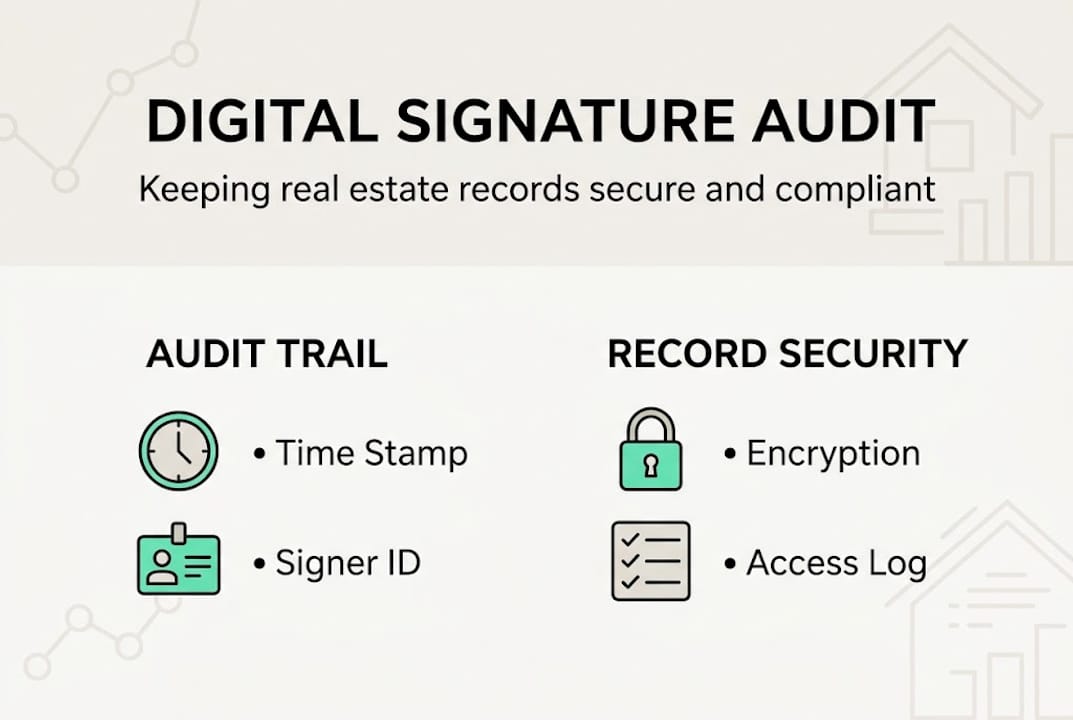
For tips on secure document storage, platforms that integrate storage directly into the transaction workspace eliminate the risk of documents being saved in the wrong folder or lost in an email chain.
Client and staff training matters more than most agents realize. A signed document stored incorrectly, or a team member who cannot locate the audit trail under pressure, creates unnecessary risk. Build a simple retrieval protocol and review it quarterly.
Why digital signatures alone won't fix real estate transaction delays
Here is the uncomfortable truth: adding e-signature technology to a broken process just creates a faster broken process.
The data backs this up. Adoption lags due to costs cited by 50% of firms, stakeholder buy-in issues at 42%, and tech problems at 41%. These are not technology failures. They are strategy failures.
The agents and brokerages that see the biggest speed gains from digital signatures are the ones who redesigned their entire transaction workflow first. They aligned their lenders, title companies, and clients before rolling out new tools. They trained everyone, not just themselves.
Partial digitization is often worse than no digitization. When an agent uses e-signatures but their title company still faxes documents, the bottleneck just moves. The closing is still slow. The frustration is still there.
Our perspective: treat digital signatures as one component of a fully digital transaction strategy. The technology is only as powerful as the ecosystem around it. Stakeholder alignment, consistent compliance, and end-to-end process design are what actually move the needle on closing speed.
Ready to upgrade your real estate workflow?
If this guide showed you anything, it is that digital signatures work best inside a system built for them. Not bolted onto email chains and paper forms.

Explore KeyChain, the all-in-one real estate transaction platform built for agents, buyers, and sellers. KeyChain.ai combines AI-powered contract drafting, legally binding encrypted digital signatures, and collaborative transaction workspaces into one seamless platform. NAR-compliant. Secure. Built for the modern transaction. At just $20/month for agents, it is the most complete digital transaction solution available. See how KeyChain can close your next deal faster, cleaner, and fully compliant.
Frequently asked questions
Are digital signatures legal for real estate contracts in all 50 states?
Digital signatures are legal in all states for most real estate transactions under ESIGN and UETA, but a few states require wet ink for specific documents like deeds or mortgages.
Which documents cannot be digitally signed in real estate?
Deeds and mortgages in NY, GA, NC, and PA, as well as FHA HECM notes, still require wet ink signatures regardless of the platform used.
What is the main benefit of using digital signatures in real estate?
Digital signatures dramatically speed up transactions while reducing errors. 83% of lenders report better borrower satisfaction and 82% report improved staff efficiency after adopting digital closings.
How is a signer's identity verified in the digital signature process?
Identity is verified via email, SMS, or ID check before a signer can access the document, typically through a unique access code tied to the signing session.